

What Is Time to Trust?
Time to trust measures how long a buyer waits between asking for security proof and accepting it. Treat it as a revenue metric that gates deal velocity, not a compliance chore.
What is time-to-trust?
Time to trust is the elapsed time between a prospect requesting security proof and that proof being delivered and accepted by the buyer. It starts when a buyer asks the first security question and ends when their review is satisfied. The shorter it is, the faster a gated deal can close.
The metric treats security review as a revenue event, not a back-office task. Most security questions arrive late in the sales cycle, often after verbal agreement, so the clock usually runs while a signature is waiting. That places time-to-trust directly on the critical path to revenue.
Several roles own pieces of it:
- The revenue or proposal team owns the buyer relationship and the deadline.
- Sales engineers field the first technical and security questions.
- The governance, risk, and compliance (GRC) team and the CISO own the underlying answers and evidence.
- RevOps owns the measurement and reporting.
No single team controls the full clock, which is why it is easy to leave unmeasured. For the surrounding work, see security questionnaire automation and the trust center glossary entry.
How does time-to-trust work as a metric?
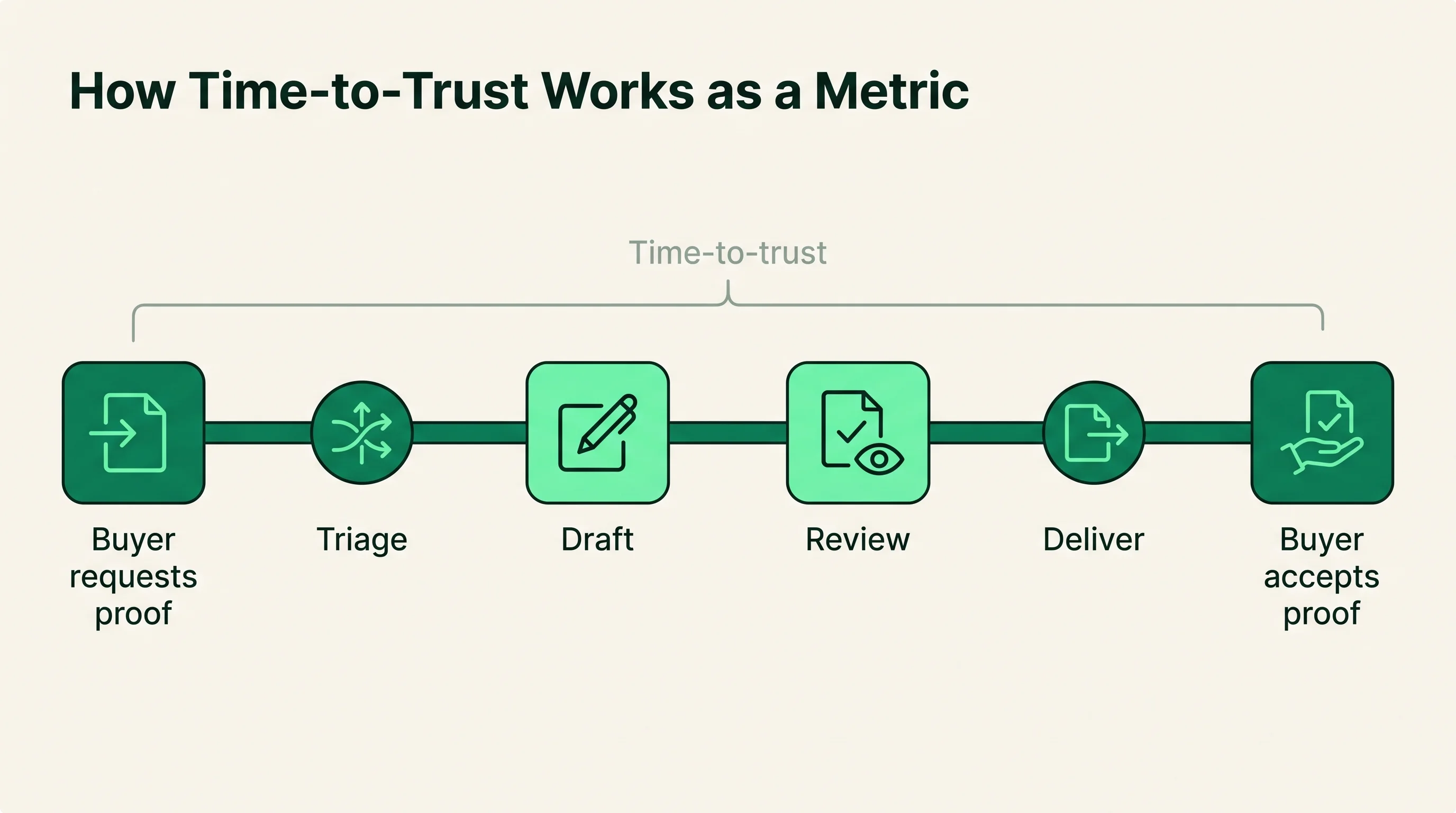
Time-to-trust works by measuring one clock across the whole proof exchange, from request to acceptance. You set a clear start and stop event, then track the elapsed business time between them per deal. The discipline is consistency, not precision to the minute.
A standard sequence looks like this:
- Start: the buyer requests proof (a questionnaire, a SOC 2 report, a CAIQ or SIG, or trust center access).
- Triage: the request is routed to the right owner and matched against existing answers.
- Draft: known answers are reused from the answer library; gaps go to a subject-matter expert.
- Review: security or GRC approves the response and any caveats.
- Deliver: the completed proof or portal access goes back to the buyer.
- Stop: the buyer accepts the proof and clears the security gate.
The answer library, your stored evidence, and a trust center are what compress the middle steps. When current answers and reports are already approved and self-serviceable, triage-to-deliver can collapse from weeks to hours. Measure the full clock, but expect most of your savings to come from the draft and review steps.
How do you measure time-to-trust stage by stage?
You measure time-to-trust by breaking the single clock into named stages and logging the time spent in each one. A whole-clock number tells you that a deal is slow; a stage breakdown tells you where it is slow and who can fix it. Most teams find that two or three stages account for the bulk of the delay, and those are the stages worth instrumenting first.
The table below maps each stage to the work it covers and what typically drives the delay. The hour and day ranges are illustrative, drawn from common patterns in mid-market and enterprise SaaS reviews, not measured benchmarks. Treat them as a shape to test against your own data, not as targets to copy.
| Stage | Illustrative range | What drives delay |
|---|---|---|
| Request received to triaged | Hours to 1 day | Unrouted intake, no clear owner |
| Triaged to evidence located | Hours to 2 days | Scattered docs, expired reports |
| Evidence to answer drafted | 1 to 5 days | Manual rewriting, no answer library |
| Drafted to reviewed and approved | 1 to 4 days | SME queue, security backlog |
| Approved to delivered | Hours to 1 day | Format conversion, portal upload |
| Delivered to buyer-accepted | 1 day to weeks | Buyer TPRM cycle, follow-up rounds |
Two stages sit outside your direct control: evidence freshness depends on your compliance cadence, and the final acceptance stage runs on the buyer's TPRM timeline. Spend your effort on the draft and review stages, which a stronger answer library and cleaner routing actually move.
Why does time-to-trust matter?
Time-to-trust matters because it sits on the revenue critical path, and slow proof stalls deals that are otherwise ready to close. When security review drags, momentum decays, competitors get a second look, and quarters slip. The cost is rarely a lost answer; it is lost time.
The manual approach creates that drag in predictable ways. Sales engineers chase SMEs, GRC rewrites answers they have written before, and stale responses trigger follow-up rounds. Each handoff adds days.
| Dimension | Manual review | Structured review |
|---|---|---|
| First response | Several days to weeks | Same day to a few days |
| Answer source | Rebuilt per request | Reused from answer library |
| SME load | High, repeated | Low, gaps only |
| Buyer self-service | None | Trust center access |
| Typical clock | Multiple weeks | Days |
Ranges above are directional, drawn from common patterns in mid-market and enterprise SaaS reviews rather than a single benchmark. The pattern holds even when the numbers vary: structure removes the repeated work that lengthens the clock. That is why revenue leaders watch this metric next to cycle length.
What drives time-to-trust up?
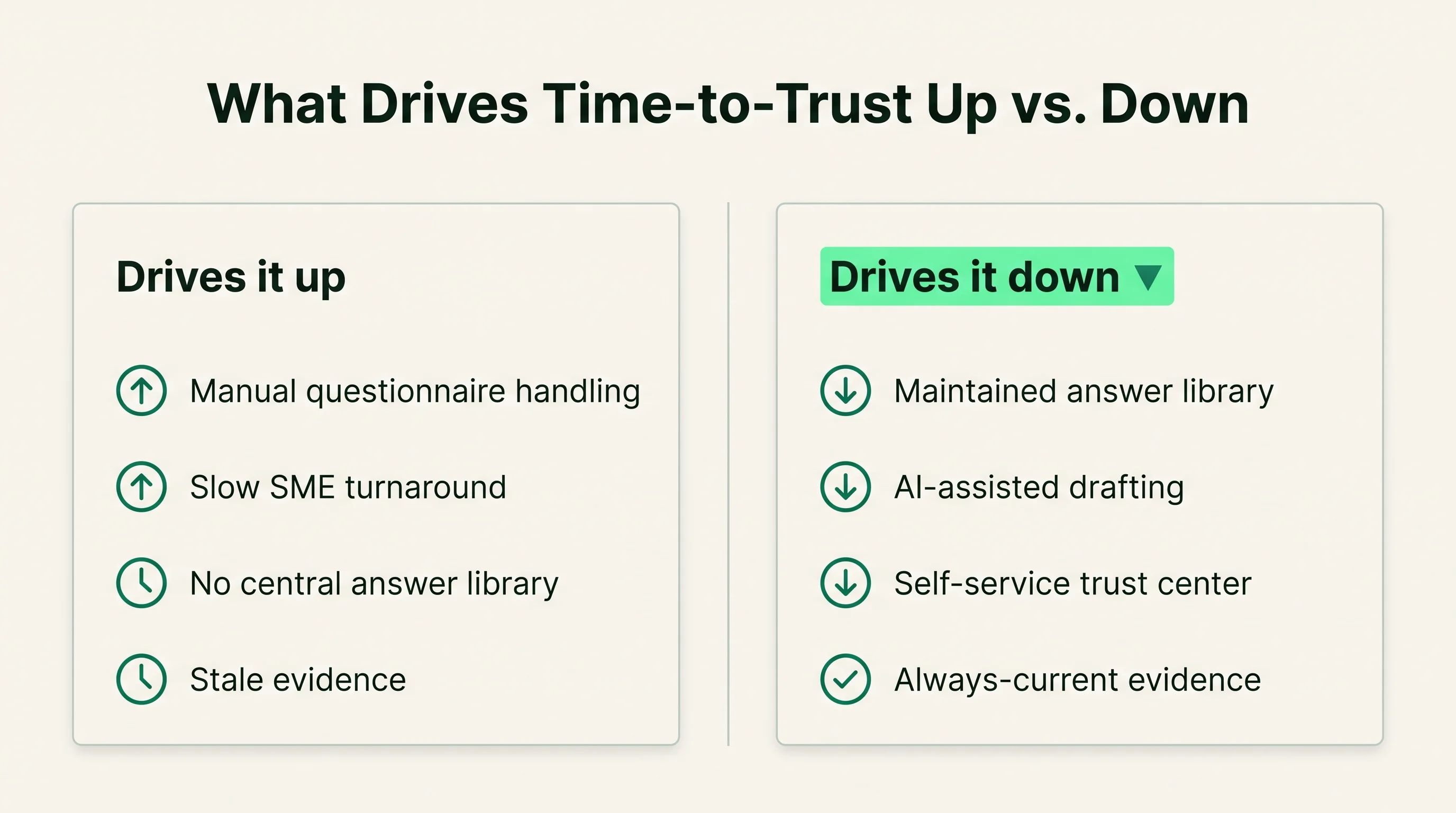
Time-to-trust climbs whenever a proof request forces new work instead of reuse. Every stage that depends on a person finding, rewriting, or re-approving an answer adds days, and those days compound when several requests land at once. The drivers below are the ones that show up most often when a deal sits in security review for weeks.
- Manual questionnaire handling: copying questions into spreadsheets and pasting answers back by hand is the single largest source of drag, because it repeats work the team has already done.
- Slow SME turnaround: when a question routes to an engineer or security lead who is not staffed for it, the answer waits in a personal queue with no service level.
- No central answer library: without one approved source, each response is rebuilt from scratch and re-reviewed, even when the answer has not changed.
- Stale evidence: an expired SOC 2 report or an out-of-date CAIQ triggers buyer follow-up rounds that restart the clock.
- Format mismatch: a buyer who insists on their own questionnaire format forces manual re-keying, even when every answer already exists.
- Unclear ownership: when no one owns the clock, requests stall in triage because routing is informal and untracked.
- Buyer-side TPRM depth: enterprise buyers with formal third-party risk management run longer acceptance cycles, sometimes with multiple review committees.
The first six drivers are inside your control; the last is not. Fixing the internal drivers shrinks the part of the clock you own, which is usually most of it. Attack manual handling and SME turnaround first, since they sit on the draft and review stages where the most time is lost.
What drives time-to-trust down?
Time-to-trust drops when reuse replaces rework, so that most of a proof request is answered from material that is already approved and current. The mechanisms below each remove a specific handoff or rebuild step. Named vendors are reference points for where a capability lives, not endorsements, and any speed claim from them is vendor-reported.
- A maintained answer library: a single approved source that drafting pulls from removes the rewrite step. Questionnaire automation from Conveyor, Loopio, Responsive, and Whistic centers on building and reusing this library.
- AI-assisted drafting: matching incoming questions to prior approved answers cuts the time to assemble a first draft. Conveyor, Responsive, and Loopio market AI drafting against the library, vendor-reported.
- Self-service trust centers: a portal where buyers retrieve reports and answers themselves removes the request-to-deliver loop entirely. SafeBase, Vanta, and Conveyor offer trust center products.
- Always-current evidence: when compliance automation keeps SOC 2 status and control evidence fresh, fewer requests trigger follow-up rounds. Drata and Vanta keep evidence current as a byproduct of their compliance platforms, vendor-reported.
- Automatic SME routing: routing only the genuine gaps to the right expert, with a tracked deadline, shortens the slowest handoff. Loopio and Responsive include assignment and workflow routing.
- NDA and access gating built in: trust centers that handle access requests and document gating remove the manual back-and-forth before proof can be shared. SafeBase and Vanta market gated access flows.
The levers stack: a library feeds drafting, drafting feeds review, and a trust center removes some requests before they reach a person. Start with the library and current evidence, the prerequisites that make every other lever work.
Where does time-to-trust sit next to adjacent surfaces?
Time-to-trust is the outcome metric; questionnaire automation, trust centers, and TPRM are the surfaces that move it. It measures the buyer's wait, while those tools change how that wait is produced. Confusing the metric with the tooling leads teams to buy software without tracking whether the clock actually drops.
Here is how the surfaces relate:
| Surface | What it is | Effect on time-to-trust |
|---|---|---|
| Questionnaire automation | Drafts answers from a library | Cuts draft and review time |
| Trust center | Self-serve portal for proof | Removes the request-to-deliver loop |
| RFP/proposal response | Structured bid replies | Shares the same answer library |
| TPRM | The buyer's review process | Sets acceptance criteria |
TPRM is the one surface you do not own; it lives on the buyer's side and defines what counts as accepted. For the boundary between the two tooling categories, see where questionnaire automation and trust centers each fit. The practical point: time-to-trust is what you report, and these surfaces are the levers you pull.
What are the benefits and tradeoffs of tracking it?
Tracking time-to-trust gives revenue teams an early warning system for deals stuck in security review. It surfaces a bottleneck that pipeline reports usually hide, because a deal in security review still looks healthy in the CRM. The payoff is real, but the metric has limits worth stating plainly.
Benefits:
- Makes a hidden bottleneck visible and assignable to an owner.
- Connects security work to revenue, which helps fund trust center and automation investment.
- Gives proposal teams a forecast input: deals with long proof clocks slip more often.
- Rewards investment in the answer library by showing the clock drop.
Tradeoffs and limits:
- The acceptance step depends on the buyer's TPRM process, which you cannot control.
- Clean measurement needs a defined start and stop event, which many CRMs do not capture by default.
- Optimizing the clock can tempt teams to cut review rigor; speed must not override accuracy.
- For low-security or self-serve buyers, the metric adds overhead with little payoff.
It is not worth heavy instrumentation if security review rarely gates your deals. Track it where security questions show up consistently and late, which is most common in mid-market and enterprise B2B.
Who owns time-to-trust and how should teams act on it?
Time-to-trust is owned jointly, with RevOps accountable for the number and security accountable for the answers behind it. The reason the metric so often goes untracked is that no single function holds the whole clock, so a clear split of responsibility is the first practical step. The table below assigns each part of the work, then a short action list turns it into a plan.
| Team | Role on the clock | Acts on |
|---|---|---|
| RevOps | Accountable for the metric | Defines start/stop, reports median and tail |
| Revenue/proposal | Owns the buyer deadline | Flags gated deals, sets expectations |
| Sales engineering | First responder | Triages and routes incoming questions |
| Security/GRC | Owns answers and evidence | Maintains library, approves responses |
| CISO | Sets review standard | Balances speed against rigor |
To act on it, work in this order:
- Define one start event and one stop event, and stamp both in the CRM per deal.
- Report the median and the worst-case tail, never a blended average that hides stuck deals.
- Segment by buyer type and deal size, since enterprise TPRM always runs longer than self-serve.
- Assign the draft and review stages to named owners with a service level.
- Review the answer library on a schedule so stale answers stop triggering follow-up rounds.
The point of the split is that improvement requires both sides. RevOps cannot shorten a clock that security has not staffed, and security cannot prove its impact without RevOps measuring it. To go deeper on the underlying tooling, compare options in the security questionnaire automation category and review the Conveyor profile as one reference point.
How this article was reviewed
Sources reviewed
- AICPA SOC 2Primary source for SOC 2 reporting referenced as security proof
- ISO/IEC 27001Information security management standard cited as buyer-requested evidence
- Cloud Security Alliance CAIQSource for the Consensus Assessments Initiative Questionnaire format
- Shared Assessments SIGSource for the Standardized Information Gathering questionnaire
- Vendor product documentationConveyor, Vanta, SafeBase, Loopio, Responsive, Whistic, and Drata capability claims are vendor-reported, not independently verified
FAQ
What is time-to-trust?
Time-to-trust is the elapsed time from a prospect requesting security proof to that proof being delivered and accepted by the buyer. It starts at the first security question and ends when the buyer's review is satisfied. Treat it as a deal-velocity metric, because the clock usually runs while a signature is waiting.
What are the most common mistakes when tracking time-to-trust?
The most common mistake is failing to define a clear start and stop event, which makes the number unreliable. Teams also report averages that hide stuck deals, optimize for speed at the expense of review accuracy, and credit tooling without confirming the clock actually dropped. Log the request and acceptance events per deal, and report the median alongside the worst-case tail.
How does tracking time-to-trust compare to handling security review manually or with spreadsheets?
Manual and spreadsheet review can still close deals, but they leave the proof clock invisible and long because answers are rebuilt per request and SMEs are pulled in repeatedly. Tracking time-to-trust makes the bottleneck measurable and assignable. The metric works best paired with an answer library and a trust center, which compress the draft and delivery steps that spreadsheets cannot.
How do you get leadership buy-in for investing in time-to-trust?
Tie the clock to revenue: show how many gated deals sit in security review and how long they wait. Pull a sample of recent deals, measure the proof clock, and estimate slipped or lost revenue from the delay. Leaders fund the answer library, automation, and trust center far more readily when the metric is framed as deal velocity rather than compliance overhead.
How do you benchmark your time-to-trust against peers?
Reliable cross-company benchmarks are scarce, so anchor first to your own baseline and segment by buyer type and deal size. Enterprise buyers with formal TPRM processes will always run longer than mid-market self-serve buyers, so a blended average is misleading. Compare your median and worst-case tail over time, and treat any vendor-published speed figures as vendor-reported rather than independent benchmarks.