

What Is Security Questionnaire Portal Autofill?
Security questionnaire portal autofill is software that fills a buyer's web-based questionnaire portal field by field, pulling answers from your approved library so a person does not have to retype them by hand. It targets the format that breaks most automation: the login-gated web portal.
What is security questionnaire portal autofill?
Security questionnaire portal autofill is software that enters your security answers directly into a buyer's web-based questionnaire portal, filling each form field from a library of approved answers instead of having a person type them by hand. It targets one specific format: the login-gated web portal that a buyer asks you to complete inside their own system. The autofill does the field-by-field entry; a person still reviews and owns the answers that go in.
A security questionnaire is a structured set of questions a buyer sends to assess a vendor's security posture before or during a deal. It usually covers access controls, encryption, data handling, incident response, and compliance status such as SOC 2 or ISO 27001. Questionnaires arrive in several formats, and the portal is the one that resists automation hardest.
The formats teams deal with are:
- Excel spreadsheets, often with merged cells and locked rows
- Web portals that require a login and field-by-field entry
- PDFs, sometimes scanned or exported
- Standardized templates such as the CAIQ from the Cloud Security Alliance and the SIG from Shared Assessments
Portal autofill exists because a spreadsheet can be parsed in one pass, but a portal makes you log in, click into each question, and submit answers one field at a time. That is slow, repetitive work, and it is where teams lose the most hours. The detailed mechanics of this format are covered in our workflow on handling portal-based security questionnaires.
Ownership varies by company. The work commonly sits with GRC (governance, risk, and compliance) or a dedicated security team that owns the approved answers. At many companies sales engineering or a sales engineer drives the timeline, because a portal questionnaire blocks a deal and the pressure is commercial. The CISO owns the accuracy of what is claimed. Autofill is shared across these roles: security owns the answers, sales tracks the deals it unblocks.
How does security questionnaire portal autofill work?
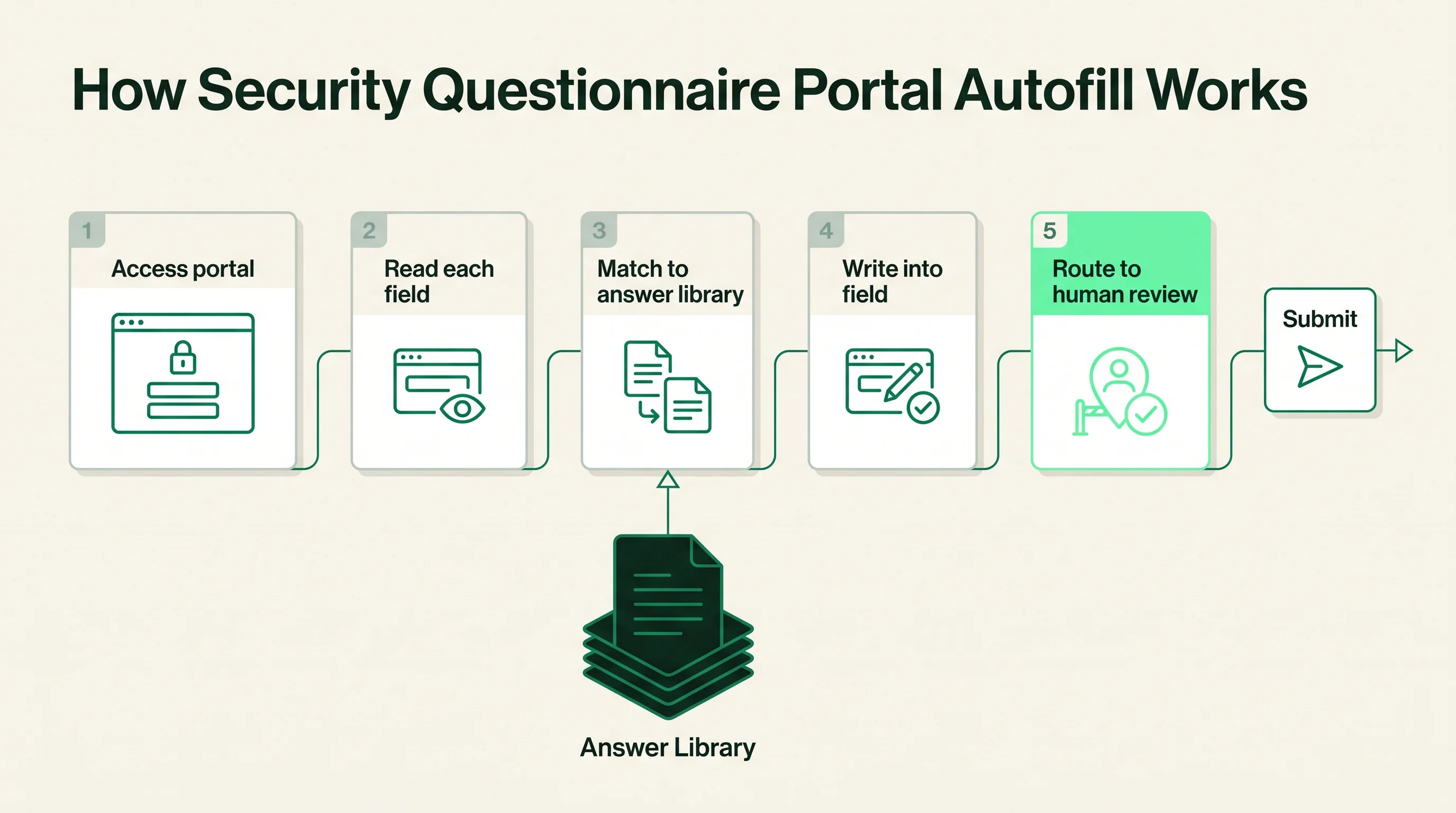
Portal autofill works by reading the questions on a buyer's portal, matching each one to an approved answer in your library, and writing that answer into the portal's form fields. The process runs in a short sequence with a human review step before submission.
The typical flow is:
- Access the portal, usually after a person logs in or grants the tool a session
- Read each question and its field type, whether a text box, dropdown, or yes/no toggle
- Match every question to an approved answer in the answer library
- Write the matched answer into the corresponding field
- Route low-confidence or unmatched questions to a human before anything is submitted
The answer library is the source of truth. Each portal question is matched against approved answers the team has already written and signed off. Older matching relied on keyword overlap, which broke when a buyer phrased a familiar question in new words. Current tools use AI semantic matching, which compares the meaning of the question to the meaning of stored answers, so "do you encrypt data at rest" and "is stored customer data encrypted" resolve to the same approved answer.
The field-writing step is what separates portal autofill from spreadsheet automation. The tool has to interact with a live web form, which it does in one of two ways:
- Browser automation, where the tool drives a browser session and types into fields the way a person would, often through a browser extension or a controlled session
- Direct integration, where the autofill vendor has built a connection to a specific questionnaire portal and exchanges data with it
Browser automation is more flexible but more fragile, because it depends on the portal's current page layout. Direct integration is more reliable but only covers portals the vendor has explicitly built for. Either way, the human review gate is the control that keeps a person accountable for every answer, the same gate used across security questionnaire automation more broadly. Each approved answer should link to its evidence, such as the SOC 2 report or ISO 27001 certificate, so a reviewer can verify a filled answer in seconds.
Why portal autofill matters
Portal autofill matters because login-gated portals are the most time-consuming format a security or GRC team faces, and they cannot be batch-processed the way a spreadsheet can. A portal forces a person to log in, navigate to each question, paste an answer, and move to the next field, often across hundreds of questions, while a stalled portal questionnaire holds up a signed contract.
The concrete pain is repetitive manual entry of answers the team has already written many times, which pulls subject-matter experts into near-identical work and lets answers drift as different people phrase the same control differently. A buyer reviewing the responses notices when one control is described three ways.
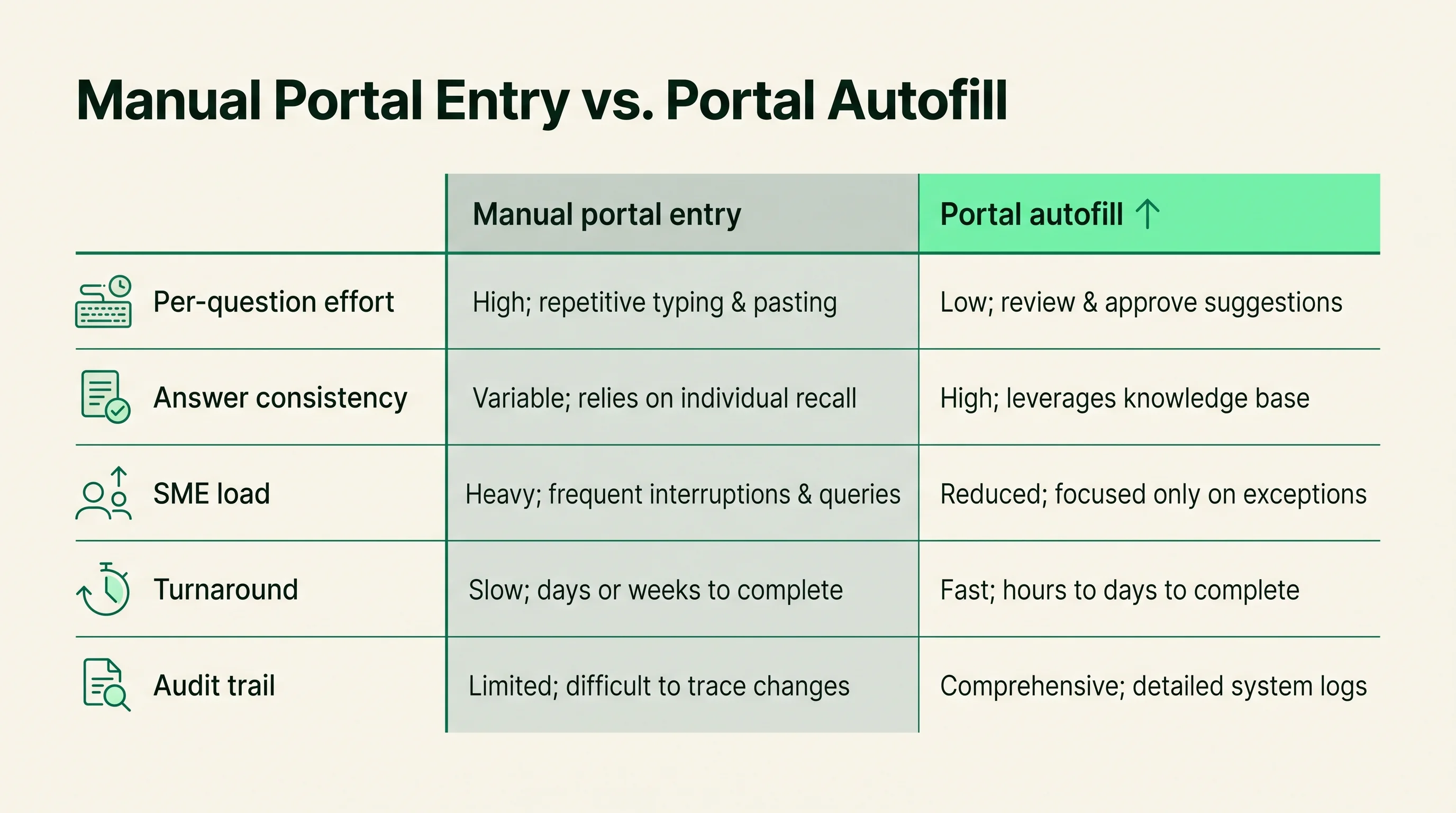
The difference between the two approaches is direct:
| Dimension | Manual portal entry | Portal autofill |
|---|---|---|
| Per-question effort | Find, copy, paste, format, repeat | Matched and filled, then reviewed |
| Answer consistency | Drifts across people and sessions | Pulled from one approved library |
| SME load | High, the same experts re-answer | Lower, experts review exceptions |
| Turnaround | Hours to days per long portal | A review-and-approve cycle |
| Audit trail | Scattered, hard to reconstruct | Recorded against approved answers |
The shift is from typing answers to reviewing them. That is where the time is saved, and it is also why the answer library, not the autofill itself, determines whether the output is accurate.
Where portal autofill sits next to adjacent surfaces
Portal autofill is one capability inside security questionnaire automation, focused on the web-portal format, and it sits next to spreadsheet ingestion, trust centers, and RFP response. All of these can draw on the same approved answer library, which is what makes them easy to blur together.
| Surface | Its specific job | How it relates to portal autofill |
|---|---|---|
| Portal autofill | Fill a buyer's web portal field by field | The format-specific capability |
| Questionnaire automation | Answer inbound security reviews in any format | The broader category autofill belongs to |
| Trust center | Publish proof so buyers self-serve | Deflects portals before they are sent |
| RFP response | Answer revenue proposals and their security sections | Shares the same answer library |
A trust center is a published page where a company posts its security documentation, certifications, and common answers so buyers can self-serve. The model is publish once, deflect many. A strong trust center reduces how many portals you are asked to fill in the first place, because a buyer who can download the SOC 2 report and a completed CAIQ may not send a portal request. Portal autofill handles what the trust center does not deflect.
RFP and proposal response is adjacent because it shares the same underlying asset. An RFP is a buyer's request for a proposal that often includes a security section, and those questions can be answered from the same approved library. This shared asset is why vendors such as Loopio and Responsive grew from RFP response into security questionnaire work; the shape of the task, matching a question to an approved answer, is the same.
Portal autofill also relates to third-party risk management (TPRM), which is the program a buyer runs to assess its vendors. The buyer's portal is part of their TPRM workflow. When you autofill it, you are streamlining your side of someone else's risk process, which is worth understanding because it tells you what the buyer is checking for and why they require a portal rather than accepting your own documents.
Benefits and tradeoffs of portal autofill
The payoff of portal autofill is real time savings on the format that costs the most manual effort, but it comes with fragility and maintenance that buyers should weigh before adopting it. Done well, it turns a multi-hour portal slog into a review-and-approve cycle. Done carelessly, it submits wrong answers into a buyer's system at speed.
The benefits:
- Removes repetitive field-by-field typing on long portals
- Keeps answers consistent by pulling from one approved library
- Lowers subject-matter-expert load, since experts review exceptions instead of re-answering basics
- Speeds turnaround on portal questionnaires that block deals
- Records which approved answer filled each field, creating an audit trail
The tradeoffs, stated plainly:
- Portals change layouts, fields, and login flows without notice, and browser-based autofill can silently break when they do
- Coverage is uneven, because vendors support some portals well and others not at all
- Login and access add friction, since many portals require a person to authenticate before the tool can act
- Over-trust is the subtle risk: polished autofilled answers tempt teams to skim the review, and a wrong answer submitted into a buyer's portal is harder to retract than a draft
- Maintenance is a standing cost, not a one-time setup
Portal autofill is not worth it for every team. A company that fills a handful of portals a year does not need dedicated software; a maintained document of approved answers and a careful reviewer will do. The economics favor autofill when portal volume is high enough that the same experts are repeatedly pulled into identical entry work. Below that threshold, license and setup cost outweigh the time saved.
How to evaluate or implement portal autofill
Evaluate portal autofill on five things: portal format coverage, match accuracy with citations, how it handles login and access, the strength of the human review gate, and how it behaves when it hits a portal it does not support. Do not buy on headline automation percentages, which are easy to claim and hard to verify on your own portals.
Score each tool against the same criteria:
| Criterion | What good looks like |
|---|---|
| Portal coverage | Supports the portals your buyers actually use, with a clear list, not vague claims |
| Match accuracy with citations | Each filled answer cites the source approved answer or evidence, so a reviewer can verify it fast |
| Login and access handling | A clean way to authenticate and grant a session without sharing standing credentials |
| Human review gate | Routing, exception handling, and sign-off before any field is submitted |
| Graceful degradation | Flags unsupported portals and low-confidence fields instead of guessing |
Conveyor, Loopio, Responsive, Vanta, SafeBase, and Whistic are common reference points when teams build a shortlist, and they sit at different angles. Conveyor centers on security questionnaires and trust centers and markets portal handling directly. Loopio and Responsive came from RFP response and extended into security work. Vanta and SafeBase are anchored in compliance automation and trust centers. Each names its own autofill and library capabilities, and those claims are vendor-reported; the point of evaluating is to test them against your own portals rather than accept the marketing.
The most reliable test is to run a real, recent portal through a trial of each tool:
- Pick a portal questionnaire you have already completed manually, so you know the correct answers
- Watch how the tool logs in, reads fields, matches, fills, and cites
- Check that it routes low-confidence questions to a human instead of guessing
- Compare the filled answers against your approved versions for accuracy
When you are ready to shortlist, start from the security questionnaire automation category hub, then read our broader explainer on what security questionnaire automation is to place portal autofill in the full workflow. The detailed step-by-step process for responding lives in our workflow on responding to security questionnaires, and the portal-specific mechanics in our workflow on handling portal-based security questionnaires.
How this article was reviewed
Sources reviewed
- Cloud Security Alliance - CAIQPrimary source for the CAIQ format used in many questionnaires and portals.
- Shared Assessments - SIGPrimary source for the SIG and SIG Lite questionnaire definitions.
- AICPA - SOC 2Primary source for what a SOC 2 report attests when used as linked evidence.
- ISO/IEC 27001Primary source for the information security management standard used as evidence.
- Vendor product documentation (Conveyor, Loopio, Responsive, Vanta, SafeBase, Whistic)Portal and autofill capability claims are vendor-reported and should be verified in a trial, not treated as independent fact.
FAQ
What is security questionnaire portal autofill?
It is software that enters your security answers directly into a buyer's web-based questionnaire portal, filling each field from a library of approved answers instead of having a person retype them. It targets login-gated portals specifically, the format that resists automation hardest. A human still reviews answers before they are submitted, so the tool speeds the work without removing accountability.
What are the most common mistakes when implementing security questionnaire portal autofill?
The biggest mistake is treating autofilled answers as final and skimming the review, which lets a wrong answer reach a buyer's portal at speed. The second is loading a thin or stale answer library, since autofill is only as accurate as the approved answers behind it. The third is assuming broad portal coverage; confirm the tool supports the specific portals your buyers use before relying on it.
How does portal autofill compare to doing it manually or with spreadsheets?
Manual portal entry means logging in and typing every answer field by field, which is the slowest format and where teams lose the most hours. Autofill matches each question to an approved answer and writes it into the field, shifting the work from typing to reviewing. Spreadsheets are easier to automate than portals because they can be parsed in one pass, while portals require live interaction with a web form.
How do I get leadership buy-in for investing in portal autofill?
Frame it as deal velocity and expert time, not as a tooling line item. Show how many portal questionnaires block deals each quarter and how many subject-matter-expert hours go into repetitive field entry. The strongest case is a stalled portal that delayed a signed contract, paired with the recurring SME load that autofill removes.
What is the typical implementation timeline for portal autofill?
The autofill tooling can be configured in days, but the real timeline is set by building a curated answer library, which is the asset that determines accuracy. Teams with an existing approved library move faster, while teams starting from scattered past responses should plan several weeks to curate and approve answers. Maintenance is then a standing cost, since portals change and answers expire.