

What Is a Security Questionnaire Knowledge Base?
A security questionnaire knowledge base is the curated, versioned, evidence-linked store of approved answers that automation tools draw from. It is the asset that decides whether automation is accurate or just fast and wrong.
What is a security questionnaire knowledge base?
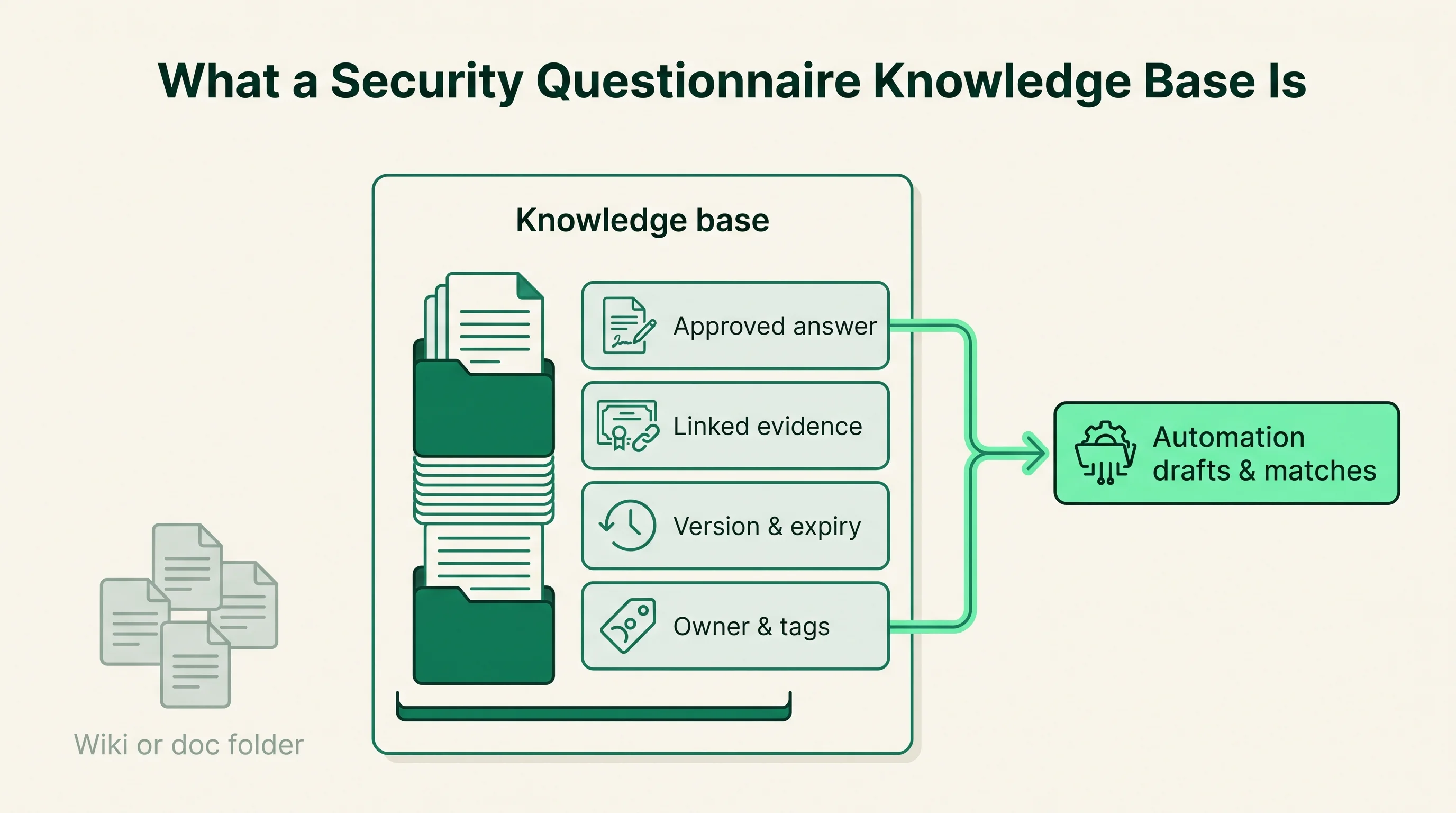
A security questionnaire knowledge base is the curated, versioned, evidence-linked store of approved answers that a team draws from when responding to security reviews. It is the source of truth that questionnaire automation software retrieves from before it drafts anything. The knowledge base holds the answers; the tool finds and reuses them.
Each entry is more than a line of text. A well-formed entry pairs an approved answer with the supporting evidence and the metadata that keeps it trustworthy.
- The approved answer, written and signed off by the right owner
- A link to the evidence that backs it, such as a SOC 2 report or an ISO 27001 certificate
- A version history showing what changed and when
- An owner and a review or expiry date
- Tags or topics so the answer can be matched to incoming questions
The terms knowledge base and answer library are used almost interchangeably, and the overlap is real. The nuance is one of scope. An answer library is the catalog of approved answers; a knowledge base is that library plus the surrounding structure, evidence, and governance that make the answers safe to reuse. In practice many vendors brand the same surface either way. Our explainer on the approved answer library covers the narrower concept in depth.
Ownership decides whether a knowledge base stays trustworthy. At most B2B SaaS companies the answers are owned by GRC (governance, risk, and compliance) or a dedicated security team, who write and approve them. A sales engineer or customer trust lead often drives the deals those answers unblock, and a CISO owns the standard the answers must hold to. The knowledge base is shared, but the security side owns the truth in it.
How does a security questionnaire knowledge base work?
A security questionnaire knowledge base works by storing approved answers once and matching them to new questions every time a questionnaire arrives. The team writes an answer, links its evidence, and approves it. From then on, the automation tool retrieves that answer whenever a buyer asks the same thing in any wording.
The flow runs in five steps:
- A buyer sends a questionnaire in some format, such as Excel, a portal, a PDF, a CAIQ, or a SIG
- The tool matches each incoming question to entries in the knowledge base
- It drafts a response from the best-matched approved answer
- A reviewer checks the draft against the linked evidence and approves or edits it
- The approved answer feeds back into the knowledge base, improving the next match
Matching is where modern tools differ from a plain document. Older approaches used keyword search, which broke when a buyer rephrased a familiar question. Current tools use AI semantic matching, comparing the meaning of the incoming question to the meaning of stored answers, so "do you encrypt data at rest" and "is stored customer data encrypted" resolve to the same entry.
Evidence linking is what separates a knowledge base from a folder of past answers. Each entry points to the artifact that proves it, so a reviewer can verify a claim in seconds and a buyer can trust that the answer is grounded in a document rather than a marketing line. The maintenance loop, where every approved send refreshes the source of truth, is documented in our workflow on building and maintaining an approved answer library.
How is it different from a wiki or a doc folder?
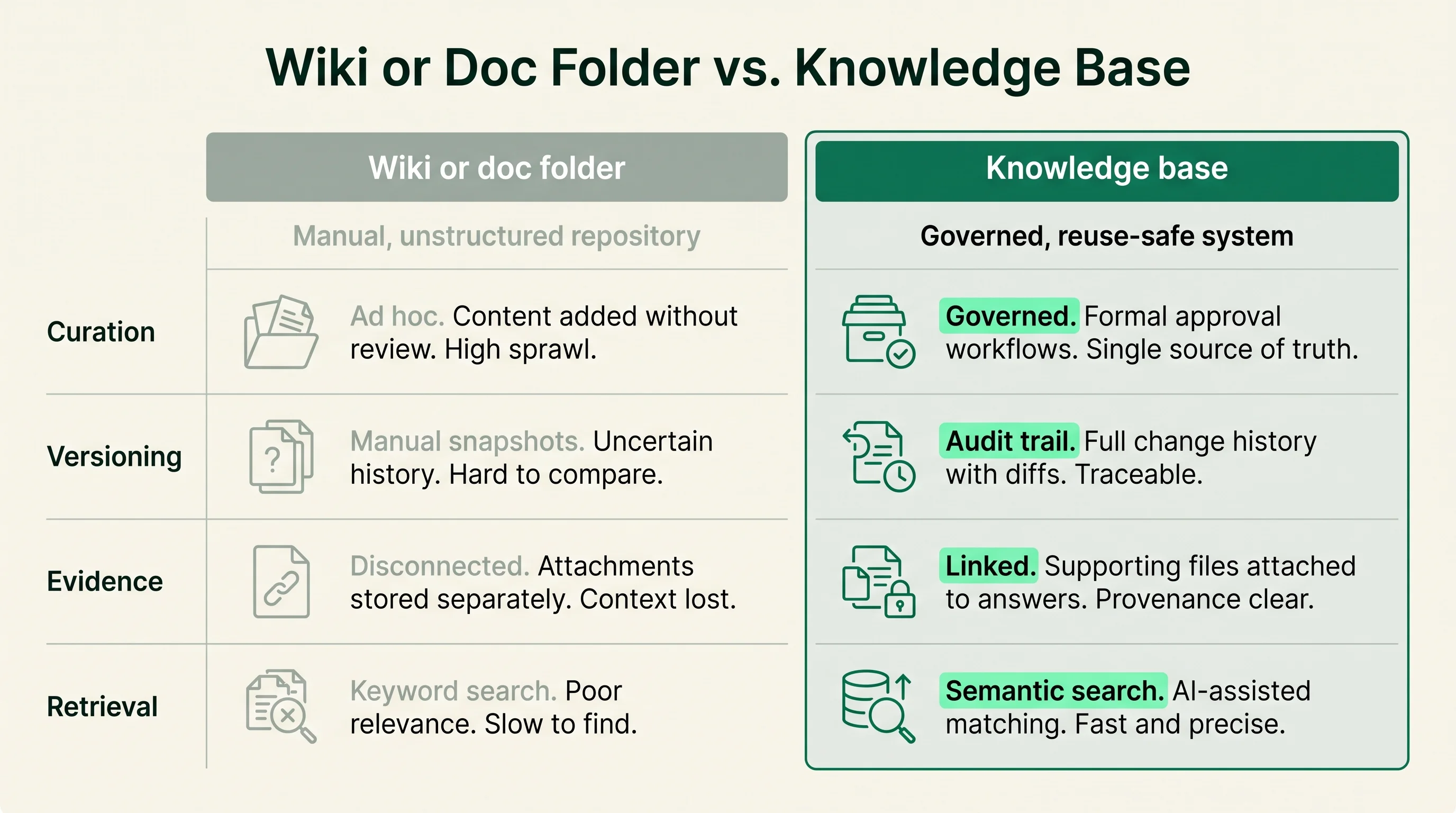
A knowledge base is governed and evidence-linked; a wiki or shared doc folder is neither. Both store answers, but only one is built to be reused safely under deadline. The difference is structure, not volume. A folder with a thousand past questionnaires is harder to trust than a knowledge base with two hundred curated entries.
The gap shows up across a few practical dimensions.
| Dimension | Wiki or doc folder | Knowledge base |
|---|---|---|
| Curation | Anyone adds; duplicates pile up | Approved, deduplicated entries |
| Versioning | Edit history at best | Version and expiry per answer |
| Evidence | Mentioned in prose, if at all | Linked artifact per answer |
| Retrieval | Manual search by a person | AI matching for the tool |
The failure mode of a wiki or folder is silent drift. An answer that named a former sub-processor, or one written before the company changed identity providers, sits there looking correct until someone pastes it into a buyer's spreadsheet. Nothing flags it as stale.
A knowledge base is designed to catch that. Versioning, expiry dates, and a named owner per entry are the controls a folder lacks. That is why teams that start with a shared doc usually migrate to a structured knowledge base once questionnaire volume rises.
How is a security questionnaire knowledge base built and maintained?
A knowledge base is built by seeding it with approved answers and maintained by reviewing them on a schedule. The build is a project; the upkeep is a standing responsibility. Teams that treat it as a one-time import are the ones whose answers quietly go stale.
The build follows a clear sequence:
- Gather the questionnaires the team has already answered
- Deduplicate near-identical answers into one canonical entry
- Have the right owner approve each canonical answer
- Link each answer to its supporting evidence
- Tag entries by topic so the tool can match them
Maintenance is the part that decides long-term accuracy. Three disciplines keep a knowledge base trustworthy.
- Review answers on a schedule, not only when one breaks in front of a buyer
- Expire answers tied to certifications, sub-processors, or controls that change
- Capture new approved answers from each questionnaire back into the base
The evidence map is worth getting right at build time, because it is what reviewers and buyers lean on later.
| Claim in an answer | Backing evidence |
|---|---|
| Audited controls | SOC 2 report |
| Information security management system | ISO 27001 certificate |
| Standardized control coverage | Completed CAIQ or SIG |
The single most common build mistake is loading volume without curation. A knowledge base full of unreviewed past answers is a liability, because the tool will confidently retrieve the wrong one. Fewer, cleaner, owned answers beat a large pile every time.
Where does it sit next to adjacent surfaces?
The knowledge base is the shared answer asset; the surfaces around it are the channels that use it. Questionnaire automation, the trust center, RFP response, and third-party risk management all draw on the same answers, which is exactly why they are easy to confuse. The knowledge base is the layer underneath all of them.
| Surface | Its specific job | How it uses the knowledge base |
|---|---|---|
| Questionnaire automation | Answer inbound security reviews | Retrieves approved answers to draft responses |
| Trust center | Publish proof, deflect repeat requests | Surfaces common answers and evidence to buyers |
| RFP response | Answer revenue proposals | Pulls security answers from the same base |
A trust center is a published page where a company posts its security documentation, certifications, and common answers so buyers can self-serve. It runs on the same knowledge base, surfacing a curated subset publicly. A strong trust center reduces how many questionnaires arrive, because buyers who find the SOC 2 report and a completed CAIQ may not send a spreadsheet at all.
RFP and proposal response is adjacent because it shares the asset. The security section of an RFP can be answered from the same approved entries, which is why vendors such as Loopio and Responsive grew from RFP response into security questionnaires.
Third-party risk management (TPRM) is the same exchange from the buyer's side. TPRM is the program a company runs to assess the vendors it buys from, and sending questionnaires is one of its activities. A good knowledge base streamlines your side of someone else's TPRM process. For the broader picture, see our explainer on security questionnaire automation.
What are the benefits and tradeoffs?
The payoff is reuse: answers written once are matched to thousands of incoming questions, so the team reviews instead of re-types. The cost is maintenance, which never ends. Both are real, and a buyer should weigh them honestly before committing.
The benefits are concrete:
- Faster turnaround, because a stalled security review can hold up a signed contract
- Consistent answers, because a sharp buyer notices when one control is described three different ways
- Lower subject-matter-expert load, because the same SMEs stop answering near-identical questions repeatedly
- An audit trail of who approved what and when, useful for the company's own audits
The tradeoffs deserve equal billing:
- The initial build is a project, and the base is only as good as the curation you put in
- Maintenance is a standing cost, not a one-time spend
- Over-trust is the subtler risk: polished AI drafts can lull a team into rubber-stamping, and a stale entry then ships as a confident wrong answer
There is a point where a dedicated knowledge base is not worth it. A company that receives a handful of questionnaires a year does not need structured software; a careful shared document and a diligent reviewer will do. The economics favor a real knowledge base when volume is high enough that the same SMEs are pulled into repeated near-identical work. Below that threshold, the setup and upkeep outweigh the saved time.
How do you evaluate a security questionnaire knowledge base?
Evaluate a knowledge base on five things: curation, versioning and expiry, evidence links, AI retrieval with citations, and ownership. Do not judge it by how many answers it holds. Entry count is the easiest number to inflate and the least predictive of accuracy.
Score each tool against the same criteria.
| Criterion | What good looks like |
|---|---|
| Curation | Deduplicated, approved entries, not a dump of past files |
| Versioning and expiry | Each answer has a version history and a review date |
| Evidence links | Every answer points to a SOC 2, ISO 27001, CAIQ, or policy artifact |
| AI retrieval with citations | Drafts cite the source entry, so a reviewer can verify fast |
| Ownership | A named owner per entry, usually in GRC |
Conveyor, Loopio, Responsive, Vanta, and SafeBase are common reference points, and they approach the knowledge base from different angles. Conveyor centers on security questionnaires and trust centers; Loopio and Responsive came from RFP response; Vanta and SafeBase reach the same surface from compliance automation and trust centers. Each names its own library and AI capabilities, and those claims are vendor-reported. The point of evaluating is to test them on your own questions, not to take the marketing at face value. For a closer look at two of them, see our profiles of Conveyor and Loopio.
The most reliable test is to run a real, recent questionnaire through a trial of each tool.
- Use one you have already answered, so you know the correct responses
- Watch how each tool matches, drafts, cites, and routes
- Compare drafted answers against your approved versions for accuracy
A trial on your actual questions tells you more than any feature grid. When you are ready to shortlist, start from the security questionnaire automation category hub and compare the leading tools side by side.
How this article was reviewed
Sources reviewed
- AICPA - SOC 2Primary source for what a SOC 2 report attests as evidence.
- ISO/IEC 27001Primary source for the information security management standard used as evidence.
- Cloud Security Alliance - CAIQPrimary source for the CAIQ format definition and structure.
- Shared Assessments - SIGPrimary source for the SIG and SIG Lite questionnaire definitions.
- NISTReference framework cited in many security questionnaire controls.
- Vendor product documentation (Conveyor, Loopio, Responsive, Vanta, SafeBase, Whistic)Capability claims are vendor-reported and should be verified in a trial, not treated as independent fact.
FAQ
What is a security questionnaire knowledge base?
It is the curated, versioned, evidence-linked store of approved answers that questionnaire automation tools retrieve from when drafting responses to security reviews. Each entry pairs an approved answer with its supporting evidence and an owner, so the team reviews matches instead of re-typing answers. It is the source of truth that decides whether automation is accurate.
What are the most common mistakes when building a security questionnaire knowledge base?
The biggest mistake is loading volume without curation, which leaves the tool retrieving the wrong answer with confidence. The second is treating the base as a one-time import and skipping the review and expiry cycle, so entries quietly go stale. The third is leaving entries without a named owner, which means no one catches a control or certification that has changed.
How does a security questionnaire knowledge base compare to spreadsheets?
A spreadsheet of past answers stores text but adds no governance, so duplicates pile up and stale answers look correct until someone sends one. A knowledge base adds curation, versioning, expiry dates, evidence links, and AI matching. For low questionnaire volume a spreadsheet and a careful reviewer can work; above that, the lack of structure becomes a liability.
How do you get leadership buy-in for a security questionnaire knowledge base?
Frame it in deal terms a CISO and a sales leader both recognize: stalled security reviews delay signed contracts, and repeated SME pulls are a hidden cost. Show how often the same questions recur and how long current turnaround takes. A knowledge base converts that repeated manual work into a review-and-approve cycle, which is the case that moves budget.
What is the typical implementation timeline for a security questionnaire knowledge base?
Seeding an initial curated base commonly takes a few weeks, depending on how many past questionnaires need deduplicating and approving. Tools can import answers quickly, but the curation and evidence-linking are the work that takes time. Plan for ongoing maintenance after launch, because the review and expiry cycle is permanent, not a closeout task.