

Security Questionnaire Automation vs. Spreadsheets
Spreadsheets are the cheap, sensible default at low volume. Security questionnaire automation earns its cost once the same answers get reused across many formats, reviewers, and deadlines. The right choice depends on your volume, your formats, and how many people touch each response.
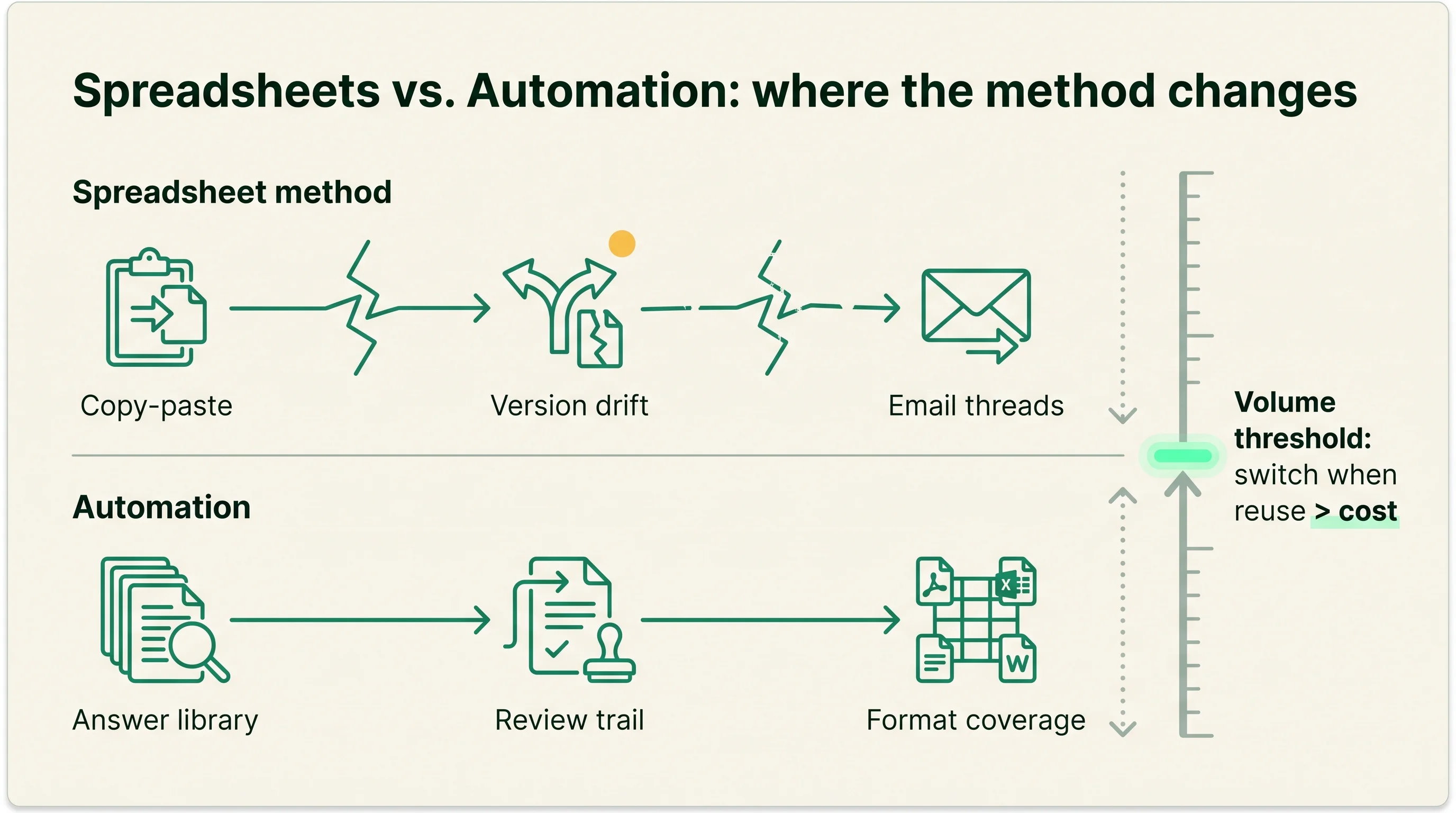
Quick answer: Security Questionnaire Automation vs. Spreadsheets
Use spreadsheets when questionnaire volume is low and one or two people own every response; move to security questionnaire automation when volume is steady, formats vary, and several roles have to keep the same answers current. Neither is universally better. The right choice depends on your formats, your volume, and the size of the team that touches each questionnaire.
A security questionnaire is the structured set of security questions a buyer sends a vendor before a deal, covering controls, certifications, and data handling. The spreadsheet method answers it by hand from an answer bank kept in Excel or a shared doc, with copy-paste and email threads doing the coordination. Automation answers it by drafting from a governed answer library, routing review and approval, and exporting into the buyer's format. If the category is new to you, our explainer on what security questionnaire automation is sets up the comparison.
The people who feel this choice are the GRC (governance, risk, and compliance) analyst who maintains the answers, the sales engineer waiting on a response to close a deal, the subject-matter expert (SME) pulled in to confirm a control, and the CISO who owns the accuracy of what gets sent. Each of them experiences the limits of a spreadsheet differently. The analyst sees the duplicated rows, the sales engineer sees the delay, the SME sees the same question land in their inbox again, and the CISO sees the risk of an unverified answer leaving the building.
The threshold is practical, not ideological. Switch when the same answers are being rewritten by the same people across enough questionnaires that the manual method costs more in time and risk than software would. That line moves with your business, so the right call this year may change as deal volume and buyer expectations grow.
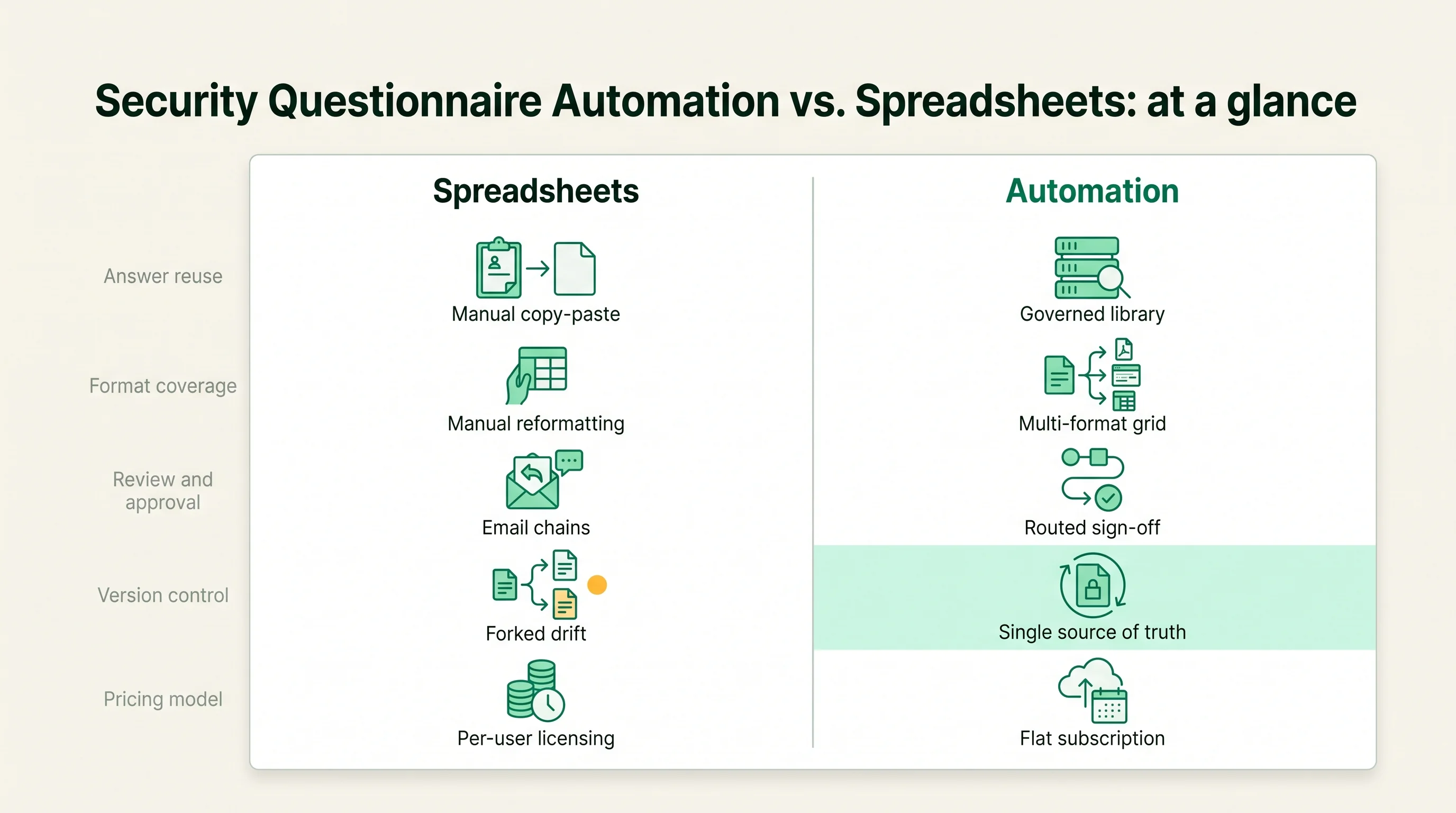
Security Questionnaire Automation vs. Spreadsheets: at a glance
The two approaches differ most on reuse, control, and format coverage, and the table below compares them on the criteria buyers weigh. Read it as a fit guide, not a scoreboard. A spreadsheet that scores lower on most rows can still be the correct choice for a team that only answers a few questionnaires a year.
| Criterion | Spreadsheets | Automation |
|---|---|---|
| Answer reuse | Manual copy-paste from a bank | Drafts from a governed library |
| AI accuracy and citations | None; a human writes each answer | AI drafts, ideally with source citations |
| Format coverage | Whatever you reformat by hand | Excel, portals, CAIQ, SIG, custom |
| Review and approval | Informal, by email | Built-in routing and sign-off |
| Version control | Manual; drift is common | Single source of truth |
| Integrations | Limited; manual export | CRM, knowledge base, trust center |
| Pricing model | Staff time only | Per-seat, per-questionnaire, or tiered |
The pattern in the table is consistent. Spreadsheets win on cost and simplicity; automation wins on control and scale. The rows that decide most purchases are version control, review trail, and format coverage, because those are the three places the manual method tends to break first as volume rises.
It helps to read the table against your own situation rather than in the abstract. A two-person team that receives five editable Excel questionnaires a year will not feel the bottom four rows at all, so the cost column dominates and the spreadsheet wins. A team fielding portals, CAIQ, and SIG across a dozen reviewers will feel every row, and the control columns start to outweigh the cost. The criteria do not change; their weight does. For a deeper look at how buyers weigh these criteria, see our guide on how enterprise buyers evaluate security questionnaire automation tools.
Where Security Questionnaire Automation is stronger
Automation is stronger wherever the same answer has to be reused, kept current, and trusted across many people and formats. Its advantage is not speed on a single questionnaire; it is control and consistency once the volume of near-identical work grows. The strengths below are where it earns its cost.
- A single source of truth: answers live in one governed library, so a control description is updated once and reused everywhere, which removes the version drift that spreadsheets accumulate.
- A review and approval trail: changes route to an owner for sign-off, and you can see who approved an answer and when, which a shared doc cannot show.
- Format coverage: the same library answers an Excel sheet, a CAIQ, a SIG, and a buyer portal, instead of forcing a human to reformat the same content by hand.
- Freshness controls: answers can be flagged for periodic re-review so a SOC 2 date or a stale policy reference does not quietly go out of date.
- SME leverage: AI drafts the repetitive answers so subject-matter experts review exceptions rather than rewriting the same response for the tenth time.
- AI drafting with citations: stronger tools generate a draft and link each answer to its evidence, so a reviewer can check the source rather than trust the text blind.
Treat specific accuracy figures and citation quality as vendor-reported until you test them on your own questionnaires. The capability is real and varies widely between products, so two tools that both advertise AI drafting can perform very differently on the same SIG. The point is structural: automation moves the work from rewriting answers to reviewing them, which is where the time savings come from at volume.
There is a second-order benefit that buyers often miss. Because the library is shared and governed, an answer improved during one questionnaire is improved for every future one, so the system gets more accurate as it is used. A spreadsheet improves only the row you happened to edit. That compounding effect is small on any single response and large across a year of them. Our explainer on grounded AI for security questionnaires covers what to verify in those claims.
Where Spreadsheets are stronger
Spreadsheets are stronger when cost and simplicity matter more than control, which is the reality for many teams early on. A clean Excel answer bank and a careful reviewer can run a low-volume questionnaire program well, and there is no shame in it. The strengths below are genuine and explain why most teams start here.
- Near-zero cost: a spreadsheet uses tools you already own, with no license, no procurement cycle, and no per-seat fee.
- No rollout: there is nothing to implement, configure, or migrate, so you can start answering today.
- Full control of the format: you see and edit every cell, with no black-box drafting between you and the answer.
- Easy to share: anyone can open a spreadsheet, so an occasional SME reviewer needs no account or training.
- Fine at low volume: when a handful of questionnaires arrive a year, a maintained answer bank covers most questions and the overhead of software is not justified.
- No vendor lock-in: your answers are a file you own outright, with nothing to export or unwind later.
The honest case for spreadsheets is that they fail slowly, not immediately. A small team can run them for a long time before the cracks show. The risk is that the cracks appear gradually, through version drift, stale answers, and rising reviewer load, so teams often stay on spreadsheets past the point where the manual cost has already overtaken the price of software.
Pricing and implementation differences
The two approaches are priced in different currencies: spreadsheets cost staff time, and automation costs a license plus the time to roll it out. That makes a straight price comparison misleading. A spreadsheet looks free because its cost is hidden in hours that never appear on an invoice.
The pricing and rollout differences break down cleanly.
| Factor | Spreadsheets | Automation |
|---|---|---|
| Headline cost | Free or near-free | Licensed software |
| Real cost | GRC, SME, and SE hours | License plus setup time |
| Pricing model | None | Per-seat, per-questionnaire, tiered, or platform bundle |
| Rollout effort | None | Library migration and configuration |
| Scales with | Hours per questionnaire | Seats, volume, or AI usage |
Automation pricing follows a few patterns. Per-seat charges for each licensed user, per-questionnaire charges by review volume, tiered pricing groups features into plans, and platform bundles fold questionnaire automation into a wider trust or compliance suite. Our breakdown of security questionnaire automation pricing models explains how each one scales and where hidden costs sit. Rollout is the part teams underestimate: the value depends on migrating a clean answer library and configuring review routing, so a tool with a messy or empty library performs no better than the spreadsheet it replaced.
The deciding number is total cost against real annual volume. Estimate the hours your team spends per questionnaire today, multiply by your annual inflow, and compare that to a quote built on your actual seats and volume. Include the hours that do not look like questionnaire work, such as the SME time spent confirming the same control and the sales-engineering time lost waiting on a stalled response. Those are real costs the spreadsheet hides.
Treat any vendor figure as a starting point for negotiation, and do not assume the cheaper headline is the cheaper outcome. A spreadsheet with a list price of zero can be the more expensive option once a senior SME is rewriting answers every week, while a licensed tool can be wasteful if your volume never justifies the seat. The honest comparison is hours and risk on one side against license and rollout on the other, measured against the volume you actually handle.
Which one should you choose?
Choose by fit, not by which approach sounds more advanced. The threshold is the point where reused, current, auditable answers across many formats matter more than zero cost and zero setup. Below that line, spreadsheets are the rational choice; above it, automation pays for itself in reclaimed time and reduced risk.
Stick with spreadsheets when: - Questionnaire inflow is low, in the range of a handful per year rather than per month. - One or two people own every response and coordination is easy. - The formats you receive are simple and consistent, mostly editable documents. - Budget is tight and the manual hours are not yet a real constraint. - No external auditor or buyer is asking you to prove a review and approval trail.
Move to automation when: - Volume is steady and rising, and the same answers are rewritten across many questionnaires. - Several roles touch each response and version drift or stale answers have already caused a problem. - Buyers send varied formats, including portals and standardized questionnaires like CAIQ and SIG. - The same subject-matter experts are pulled in repeatedly for near-identical questions. - A signed deal has stalled because a security review took too long, or you need an auditable trail of who approved what.
The practical test is to count the hours your team spends per questionnaire and how often the same answer gets rewritten. When that repeat effort and the risk of sending a stale answer outweigh the cost of software, the switch has already paid for itself. To build a shortlist, start from the security questionnaire automation category hub, and use our buyer-evaluation guide to score tools against your own volume and formats.
How this article was reviewed
Sources reviewed
- AICPA - SOC 2Primary source for what a SOC 2 report attests, relevant to the freshness and evidence references that spreadsheets struggle to keep current.
- ISO/IEC 27001Primary source for the information security management standard cited as evidence in questionnaire answers.
- Cloud Security Alliance - CAIQPrimary source for the CAIQ format, one of the standardized questionnaire types that strains the manual reformatting method.
- Shared Assessments - SIGPrimary source for the SIG questionnaire format referenced in the format-coverage comparison.
- Vendor product and pricing documentationCapability, AI accuracy, citation, and pricing-model claims are vendor-reported and should be confirmed against your own questionnaires and a quote built on your real volume, not treated as independent fact.
FAQ
Which is better, security questionnaire automation or spreadsheets?
Neither is better in the abstract; the right choice depends on volume, formats, and team size. Spreadsheets fit teams answering a handful of questionnaires a year with one or two reviewers, because they are free and need no setup. Automation fits teams with steady volume across many formats whose answers several roles must keep current, because it adds reuse, a review trail, and format coverage. Decide by counting how often the same answers get rewritten by the same people.
At what volume should a team switch from spreadsheets to automation?
There is no single number, but the trigger is when the same answers are repeatedly reused across enough questionnaires that the manual hours and the risk of sending a stale answer outweigh the cost of software. Teams handling a few questionnaires a year rarely need automation, while teams receiving them regularly across varied formats usually do. The clearest signal is subject-matter experts being pulled in again and again for near-identical questions.
Where do spreadsheets break down for security questionnaires?
Spreadsheets break down on version drift, stale answers, the absence of a review and approval trail, the subject-matter-expert bottleneck, and no coverage for portals or standardized formats. None of these fail immediately, which is why teams often stay on spreadsheets past the point where the manual cost has overtaken the price of software. The cracks show gradually as volume and the number of reviewers grow.
Does security questionnaire automation replace the answer library?
No; it formalizes it. The spreadsheet answer bank becomes a governed answer library that the software drafts from, with version control, review routing, and freshness flags layered on top. Migrating a clean library is the main rollout task, and the tool performs no better than the old spreadsheet if that library is messy or out of date. The library is the asset; the automation is what keeps it current and reused well.
Is AI accuracy good enough to trust automated questionnaire answers?
AI drafting is strong enough to handle repetitive answers and free reviewers for exceptions, but accuracy and citation quality vary widely between products and should be tested on your own questionnaires. Treat vendor accuracy claims as vendor-reported until verified. The safer pattern is tools that link each answer to its source so a reviewer checks the evidence rather than trusting the text, which keeps a human accountable for what gets sent.